IPad

Transmit: Don’t Panic on Pro iPad Apps

There’s been a lot of talk lately about Panic Ceasing Development on Transmit. It’s once again lead to a bunch of gloom and doom about making a living on the App Store and the future of pro apps on the iPad.

Personally, I think this isn’t about the iPad business model - I think it’s about market fit.

I bought Transmit for iOS. I don’t remember the last time I used it. I bought Transmit for macOS, too, but I don’t remember the last time I used it, either (I think I still have the previous version. The next time I actually run it, I’ll likely upgrade).

 1 min read

How can you edit, build and install iPhone and iPad Apps without being near a Mac?

XCAB Intro 011 001

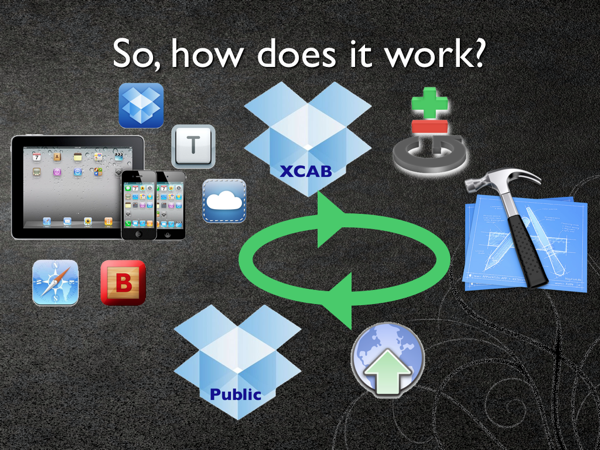
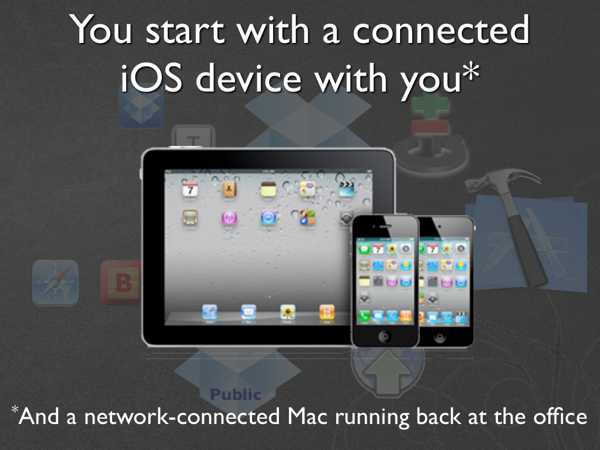
I’m going to walk you through the process that XCAB uses (These steps are taken from this SlideShow).

XCAB Intro 012 001

I have a refurb mini in my Living Room that I bought to be an Home Sharing server, and it’s more than up to the task.  I’ve run it on my laptop, too, from time to time.

As far as the iOS device, an iPad is obviously better to use for editing, because of the screen real estate, but the process is the same for both.

 2 min read

Video Demo: How to program an iPad by using an iPad, no jailbreak required

Here’s a video I put together to demonstrate how to use the code that I wrote that I blogged about last week to program an iPad with an iPad, without having to lug your laptop around with you (or jailbreak your device):

Please excuse the fuzziness, I recorded it from my iPad 2 using a setup that converted it to a Standard Definition Analog TV signal along the way. Hopefully, it is close enough that you can get the idea of how it works.

 1 min read

Programming an iPad with an iPad: Putting the "Mobile" into Mobile App Development


This is a talk I gave on Thursday at the Austin CocoaCoder group (and here is the PDF if you don’t do Flash):

Developing iOS apps on your iPad with XCAB

View more presentations from Carl Brown

The code is here on GitHub, and you’ll need this version of iOS-BetaBuilder and accounts with Boxcar and Dropbox.


It’s not perfect, yet. There’s no provision for managing XCode projects or xib files (you’ll still have to do all that on the Mac), no auto-complete or refactoring or debugging or instruments and the lag and long cycle time gets old.

 1 min read

Blog Moved to SquareSpace

Even though  Blogger is back now, I’ve moved my blog to SquareSpace.  Truth be told, I was never particularly happy with blogger.com anyway, and I don’t mind paying for decent software and services, and the SquareSpace iPad app is the best blogging experience on the iPad I’ve found, so the Blogger Outage was the kick in the pants that I needed to make the switch.

Glad I did.

 1 min read

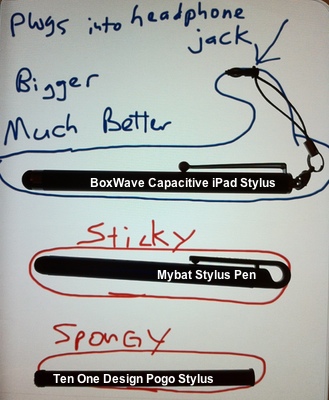
We have a Winner! (so far) - the Battle of the iPad Styli


A long, long time ago, I bought the first US Robotics Pilot 5000. Using Graffiti, I could actually take notes for the first time in a meeting that I wouldn’t have to type in later (although I did have to correct missed letters periodically).


I used PalmOS and a Stylus to take notes up through my Kyocera 7135, which I loved. But when it died, I couldn’t bring myself to get another phone with that outdated OS, so I made the jump to Windows Mobile with a Verizon xv6600 in 2004 or so. And up until recently, I still didn’t have a device I could take good notes on. I still take notes writing much faster than I do typing with my thumbs, so once I got my iPad, I went looking for a way to take notes.

 2 min read

Look, Ma, no laptop!

I implied earlier that when I use BlogPress to write a blog post with my iPhone or iPad, that I had to wait until I got to my laptop to publish it. That isn’t true. If I want to tweak it in RapidWeaver, then I have to wait for my laptop, but if I’m okay posting it without going through a proper preview step, I can just hit “Publish Now!” in BlogPress, and let RapidBlog handle the rest.

 1 min read

Blogging workflow with Reeder

I’m a huge fan of Reeder for both the iPhone and iPad. It’s so much faster and more convenient than any other Google Reader client I’ve dealt with, I haven’t launched Socialite or NetNewsWire in weeks.So, when I decided I was going to start blogging regularly, I wanted to make it easy for me to do so. This is the workflow I worked out:

I set up a blog on blogspot, and then linked it to my site (which I edit with RapidWeaver) with RapidBlog from Loghound.com. Then I used the “Email & Mobile” menu of the Settings tab of the blogspot dashboard to set up an email address, and set it to “Save emails as draft posts”. Then I added that email address to my Contacts app with the name “Blog Fodder”.Now, when I see something in Reeder I might want to blog about, I hit the action button, “email link”, and send it to my blog address. Then, I can edit it (as I’m doing now) as a draft with BlogPress on my iPad or iPhone, and when I have some time with my Mac, then I can sync and publish it to my blog with RapidBlog.Granted, it’s a little Rube Goldberg, but it makes it easy for me to capture ideas whenever they occur to me, blog during my unproductive time, and publish quickly at my leisure.Time will tell if it’s easy enough that I manage to stick with it.

 2 min read